Audio · The Mixer
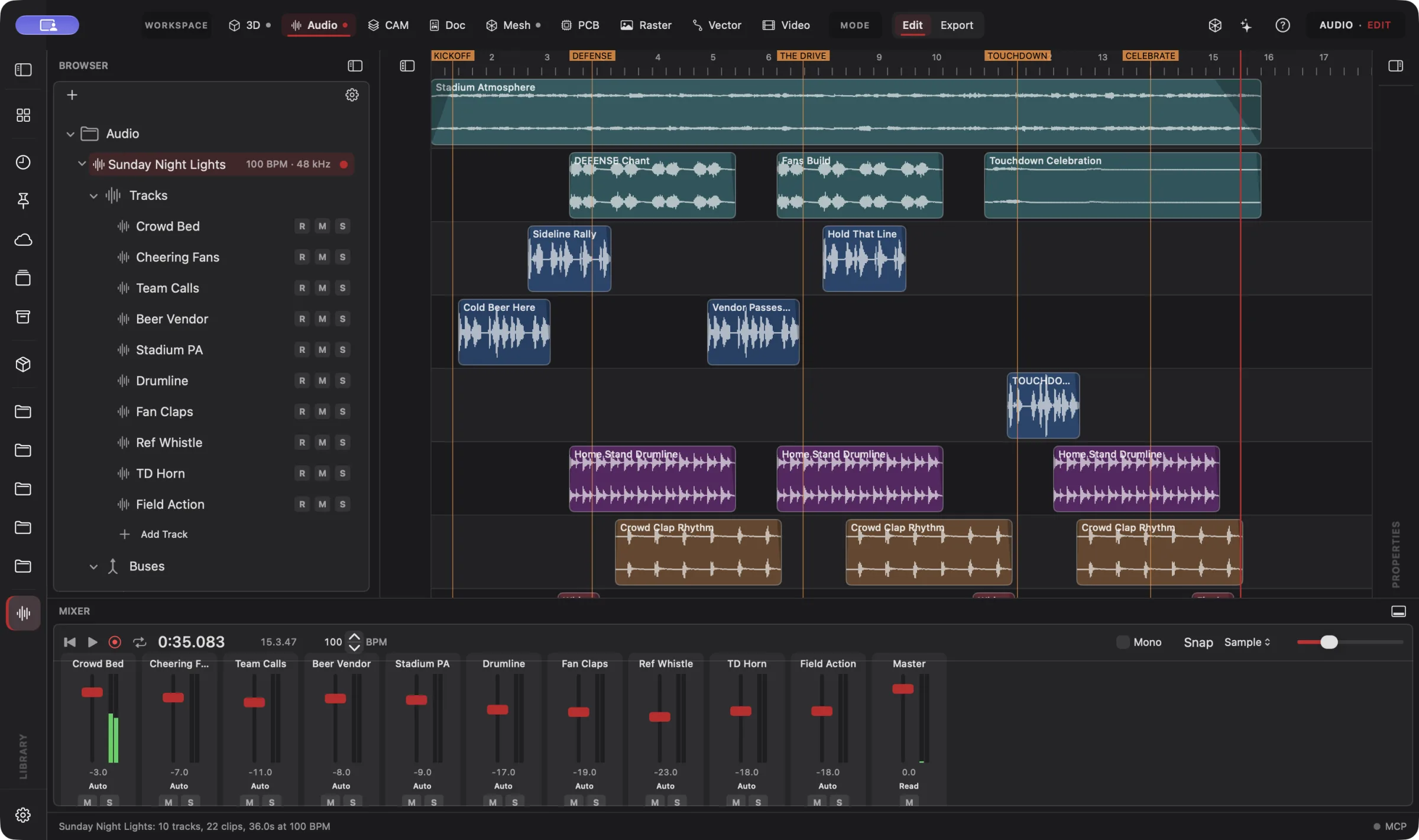 Enlarge
The Mixer
The mixer under the timeline: a fader and meter for every track, plus the master.
Audio Workspace
Give your creation a sound of its own. Record a guitar. Build the backing track. Turn a quiet 3D scene into a room full of life. Audio brings recording, instruments, MIDI composition, sound design, effects, mixing and mastering into the same project as your models, animations and video.
Connect your preferred AI through native MCP, use Wrangler to manage your providers and supported local models, or choose built-in Sidecar for focused work. Your AI creates; you direct, review and refine. Explore AI Workflows
Free 3D Workspace · One project · No credit card
macOS · Windows · Ubuntu · iOS · iPadOS · Android
 Enlarge
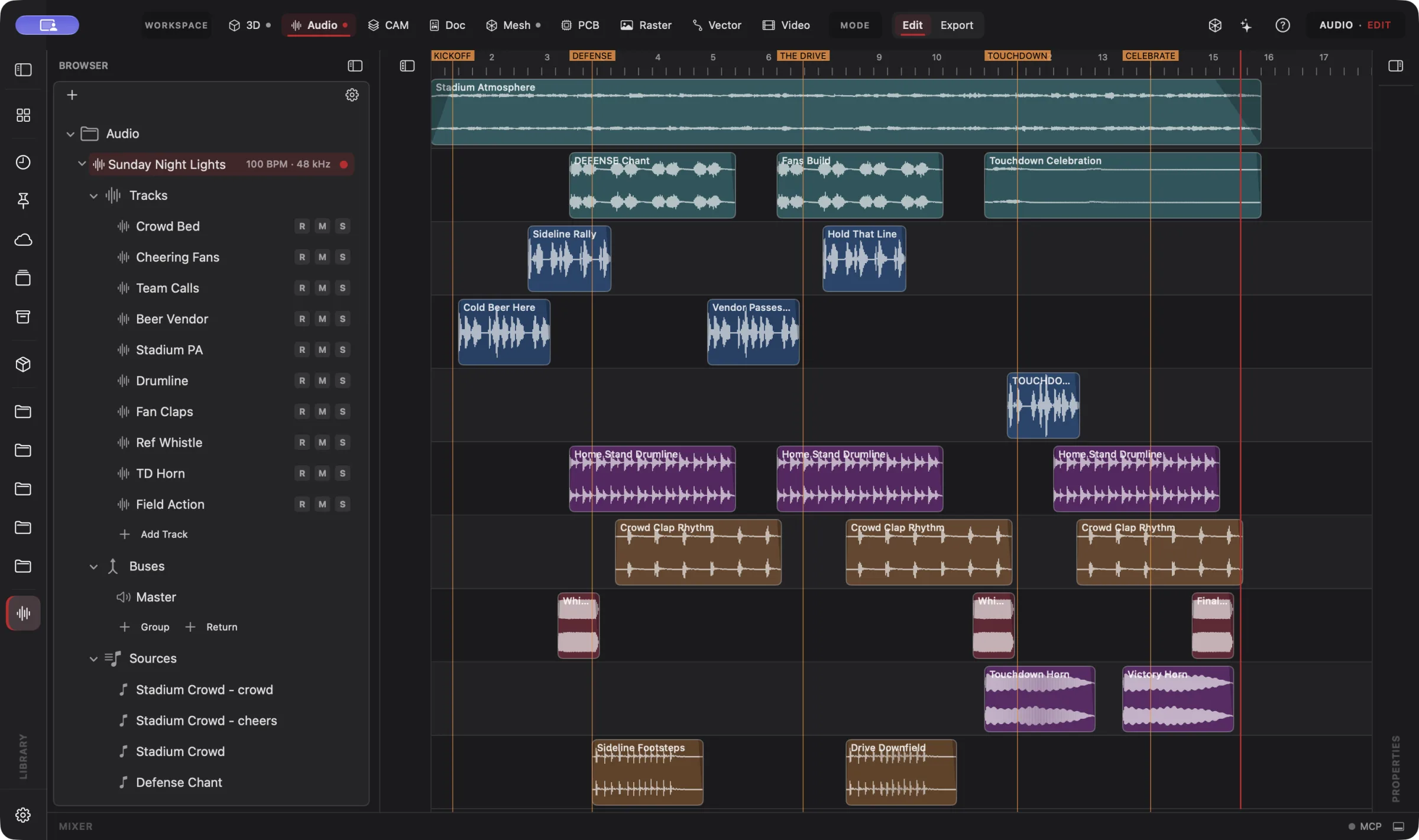
Sunday Night Lights, a stadium soundscape built from tracks, clips and sound recipes on one timeline.
Audio is part of one AI-driven design workflow: a reference image becomes artwork, physical parts, manufacturing jobs, electronics, assembly instructions and a product video. Your AI works across all nine workspaces in one project; you steer and review.
Bring an idea or the design you already started. Through native MCP, your AI sees the project geometry and makes real changes. Fireball Wrangler brings your provider accounts and supported local models together, with discovery and connection to Fireball apps when their MCP access is enabled. Built-in Sidecar handles focused tasks.
Full editing goes with you: native apps across macOS, Windows, Ubuntu, iOS, iPadOS and Android. Use touch, Apple Pencil on supported iPads, or mouse and keyboard. Windows to Mac to Ubuntu, the same .fireballdesign file keeps every workspace together. Choose cloud sync to continue on your phone, tablet or computer.
Designer is in pre-release. This site describes the complete product; download availability follows the published builds. AI capabilities depend on your chosen model and tool support.
The Fireball Trophy Project
Real screenshots from Designer v0.27.0 on macOS. Open any image for a closer look.
Enlarge
The mixer under the timeline: a fader and meter for every track, plus the master.
Before and after
Today
The model is finished and the video is cut, but the sound lives in another app: a stock whoosh here, a score exported from somewhere else, a mix you can't change without rebuilding the movie.
With Fireball Designer
The sound is built where the picture is. Your AI composes the score, designs the effects and sets the mix against the Video timeline; you refine any passage by hand, and the tracks stay editable for the next revision.
The bridge: one project that holds the model, the motion, the picture and the sound.
What it’s for
Record vocals or instruments, work with takes, edit waveforms and build drums, bass and keys on separate instrument and MIDI tracks. Design a deep cinematic hit, a rising whoosh, a mechanical click or a sky full of fireworks, and keep the recipe so you can change the sound later.
Audio is a studio in its own right. Start with a song, a recording or a sound idea; add a video or a 3D scene whenever the project calls for it. Direct a compatible AI through native MCP, use built-in Sidecar for focused tasks, or work the timeline, instruments, effects and mixer yourself. All three use the same editable project.
Headline features
Direct your connected AI to record, arrange, compose, shape the mix and prepare exports using the studio's own tools, then take over at any point to refine a passage or undo a change.
For you: your direction becomes real, editable audio work.
Microphone and instrument recording, multiple takes, waveform editing, audio and MIDI tracks, a piano roll, drum patterns, and editable tempo and chord tracks.
For you: a performance becomes a full arrangement in one place.
Instruments, synthesis and reusable sound recipes for cinematic hits, whooshes, impacts, fireworks, weather, crowds, footsteps and music, layered with your own recordings and imported audio.
For you: make the sound you need and keep the recipe.
Tracks, buses, sends and sidechains; EQ, dynamics, reverb, delay and creative effects; automation drawn on the timeline or recorded from the faders; a mastering limiter and delivery loudness targets.
For you: a mix with detail and impact, set for where it will play.
Cues tied to Video edits and animation events, with distance, obstruction and room-acoustic controls for scene-linked sound.
For you: the score follows the picture, and the picture edit stays intact.
With an audio-capable client and model, your AI can audition work in progress, compare versions and make edits. Loudness, true peak, clipping and silence checks catch technical problems along the way.
For you: an AI that can check its own work.
Finished masters, separate stems, loops and one-shots in supported formats including WAV, AIFF, FLAC and AAC, game audio event banks with a runtime manifest, and collected project packages that keep the sources and recipes.
For you: the files for the next step, and a project you can keep editing anywhere.
Built-in Sidecar
Sidecar helps with a focused change: nudging a cue to a marker, balancing a track or checking the loudness of an export. The studio itself belongs to Designer; Sidecar helps you use it for a small task.
You
Move the touchdown horn to the marker and tell me how loud the mix is.
Sidecar
→ cue moved to the Touchdown marker · mix measured against your delivery target, with anything over the limit flagged. Undo available.
Small tasks are Sidecar’s sweet spot. Quick explanations, a focused edit or help running a built-in tool. Longer projects and repeated tool calls can use Credits quickly.
Sidecar Bronze is included with Designer Pro and Commercial at no extra charge; other plans can use its free tier. Designer works completely with the panel closed.
Find the right AI help for your work →MCP · bring your own assistant
Connect your preferred compatible AI to Designer through native MCP. Let it inspect the actual project, create the first draft and refine the design through editable, undoable tool calls.
A compatible assistant can operate Audio through native MCP: create tracks, place clips against Video and animation cues, shape the mix, audition the result where the client and model support audio, and prepare exports. Tool support varies by model and client.
# Claude Code, connected to Fireball Designer over MCP
> Score the trophy reveal: a deep brass-and-bass hit under the whoosh, an electrical rise as the LEDs light, then a stadium roar.
A mastered mix and separate stems, with the tracks, instruments and sound recipes still editable.
Example prompt and the tool calls it takes. Designer’s MCP server is built into the app, off until you switch it on, and scoped to what you share. No Sidecar subscription is needed. Your assistant uses its own provider account, billing and usage limits; review its work before using the result.
Workflows
One project, every workspace
Every workspace keeps its work in the same .fireballdesign file, so a hand-off is a button (or one tool call), not an export and a re-import.
Fireball Designer Warehouse connects the maker community to your studio. Discover shared projects, like the ideas you love, save them to collections and follow the makers, then open a design and make it yours within its sharing terms. Ask your AI for changes, prepare your build and share what you learn with the next maker. Find It. Make It Yours.
Preliminary pricing
Unlimited 3D projects start at $5 a month. Add the Audio Workspace for another $5 a month: $10 total (or $110 a year). Designer Pro includes all nine workspaces for $30 a month. You can start with one 3D project for free. Audio pricing is a preliminary estimate, not a final price, and may change before launch. One Fireball account works across your Fireball apps. Under ten employees you sell what you make on any paid plan.
See Designer plansFAQ
Finished masters, separate stems, loops and one-shots in supported formats including WAV, AIFF, FLAC and AAC, plus game audio event banks with a runtime manifest. Collected project packages keep the sources and recipes needed to keep editing on another machine.
Your connected AI operates Designer's instruments and composition tools to build the music, effects and mix. It is not a generative model producing a finished recording, and everything stays editable.
With a client and model that support audio, yes: it can audition work in progress and compare versions. Loudness, true peak, clipping and silence checks provide separate technical measurements.
No. Audio stands on its own for recording, music production and sound delivery. Add a movie or 3D scene whenever the project calls for it.
Native apps across macOS, Windows, Ubuntu, iOS, iPadOS and Android, with full design editing on mobile. The same .fireballdesign file carries your project across platforms; choose cloud sync to continue on another device. Download availability follows the published pre-release builds.
Designer is free to start. Audio pricing is a preliminary estimate and may change before launch; plans are on fireballenterprise.com.